Monitoring sleep patterns is an essential aspect of maintaining good health. The Apple Watch offers a built-in feature for this purpose. With it, users can track the duration and quality of their sleep. The data gathered can offer insights into sleep habits and highlight areas for improvement.
Setting up sleep tracking on the Apple Watch involves a few simple steps. Users start by opening the Sleep app on the device and creating a sleep schedule that suits their routine. TheHealth appon the iPhone plays a key role too, as it is where all data is collected and analyzed.
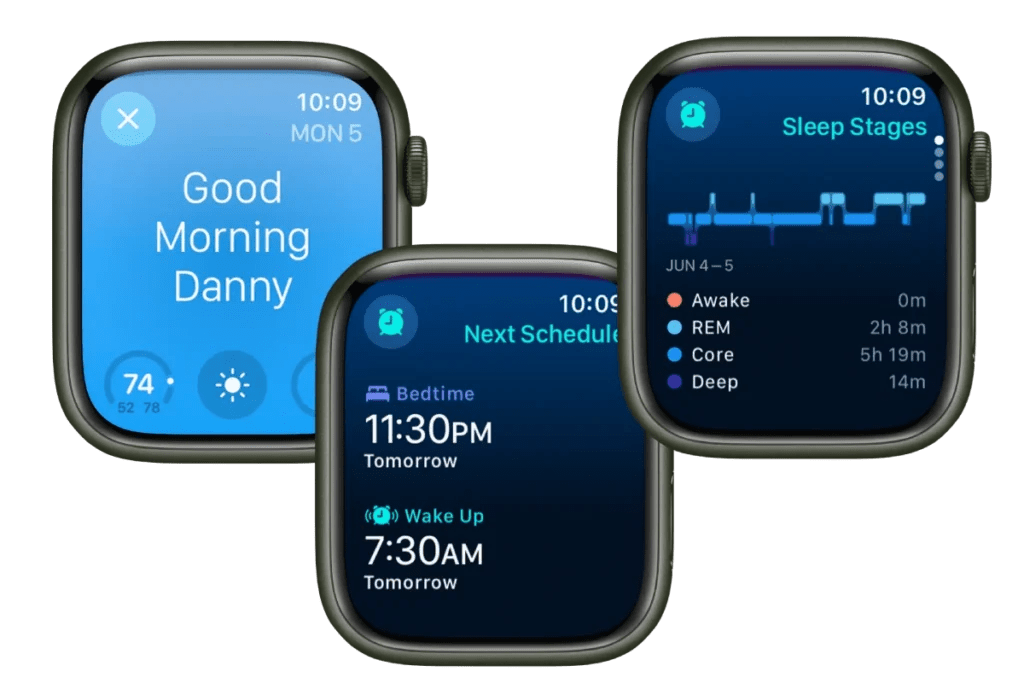
Understanding sleep data is vital for making the most of theApple Watch’s capabilities. The device provides metrics on sleep duration, the amount and timing of different sleep stages, and sleeping heart rate using its various sensors and algorithms. With this information, users can make informed decisions about their sleep schedule and habits.
How to Use Apple Watch for Sleep Tracking
Apple Watch has built-in sleep tracking features that help you monitor your rest patterns, set sleep goals, and improve your sleep hygiene. With watchOS 7 and later, all Apple Watch models from Series 3 onward can track sleep using Apple’s native Sleep app. Here’s how to set it up and make the most of it.
Set Up Sleep Tracking on Apple Watch
Key Features of Apple Watch Sleep Tracking
Optimize Battery for Overnight Wear
To track sleep consistently, your Apple Watch needs enough charge. Here’s how to manage that:
View and Interpret Your Sleep Data
On Your iPhone:
On Your Apple Watch:
Tips for More Accurate Sleep Tracking
Key Takeaways
Setting Up Your Apple Watch for Sleep Tracking
To effectively track sleep with an Apple Watch, users need to ensure the device pairs with the iPhone Health app, set specific sleep goals and schedules, understand watchOS sleep settings, and manage battery life for overnight tracking.
Pairing With the Health App
First, users must connect their Apple Watch to the iPhone Health app. Open the Health app on the iPhone and follow the on-screen instructions to pair the devices. This app stores sleep data and helps users monitor their sleep trends over time.
Configuring Sleep Goals and Schedule
Users can set personal sleep goals and craft a sleep schedule on their Apple Watch. In the Sleep app, users tap to add or adjust a sleep schedule and define the desired sleep goal in hours.
Understanding WatchOS Sleep Settings
The Apple Watch runs on watchOS, which hosts sleep tracking settings. Users navigate to the Sleep app and adjust settings to match their preferences for items like sleep reminders and wind-down time.
Optimizing Battery and Charging Reminders
To ensure the Apple Watch tracks sleep all night, users should maintain adequate battery life. The watch providescharging remindersbeforehand, prompting users to charge the device ahead of bedtime. Users can find battery settings in the Apple Watch app and receive alerts when the Apple Watch battery needs charging to last through the night’s monitoring.
Interpreting Sleep Data and Using Features
Apple Watch provides tools to understand sleep patterns and improve sleep habits. The following subsections detail how to analyze sleep data, use sleep features, view sleep trends, and integrate additional apps.
Analyzing Sleep Stages and Patterns
When using the Apple Watch, you can monitor various sleep stages such as REM, deep, and light sleep. Open the Sleep app to see the previous night’s sleep data, including time spent in each stage. This helps gauge the quality of sleep.
Utilizing Wind Down and Sleep Focus Modes
Set up Wind Down in the Health app to begin relaxing before bedtime. Sleep Focus mode silences notifications to minimize disturbances. These features aim to prepare the body for rest, aiding in a smoother transition to sleep.
Getting Insights From Sleep Trends and History
The Health app on iPhone grants access to deeper insights. Examine your sleep history, including trends over days, weeks, or months. This data reveals patterns and helps adjust habits for better sleep consistency and quality.
Integrating Third-Party Sleep Apps and Tools
For detailed sleep analysis, consider third-party apps compatible with Apple Watch. These apps may offer additional metrics like heart rate variability and sound recording. They complement the watch’s built-in capabilities.
